|
<< Click to Display Table of Contents >> SETTINGS.INI |
  
|
|
<< Click to Display Table of Contents >> SETTINGS.INI |
|
The SETTINGS.INI file is a file of project specific settings which is read by SpecView when a project is read.
It is located in the project folder (C:\SV3\<project_name>\SETTINGS.INI)
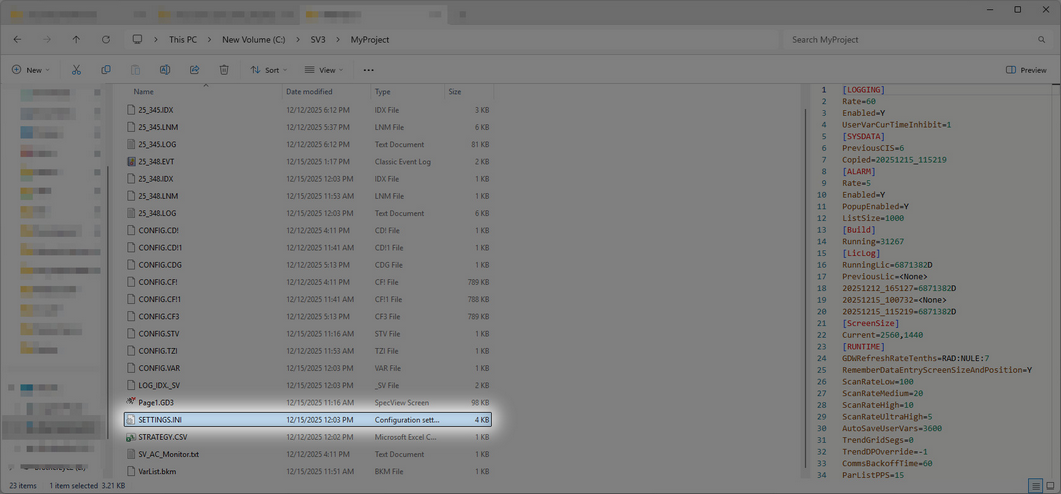
Values in it can be changed from Preferences or manually by using a text editor such as Notepad to edit the file (carefully!) while SpecView is NOT running.
See also: SV3.INI and CVTSETTINGS.INI
As of SpecView 3.1.267, users can enable their SpecView project to automatically abort after encountering an error in a Strategy invoked Recipe download. This means that users no longer must be present to abort the Recipe download.
| 1. | In the Project Folder, open the Settings.INI file in the Notepad application. |
| 2. | Under the [Recipe] section, type in “StrategyAutoContinue=N”. |

| 3. | Save and close the SETTINGS.INI file. |
Strategy invoked Recipe downloads will now automatically abort when it encounters an error.
Additionally, entering "DownloadToReadOnly=Y" enables users to download values to read-only variables using Recipe.