|
<< Click to Display Table of Contents >> Variable Substitutions |
  
|
|
<< Click to Display Table of Contents >> Variable Substitutions |
|
These strings represent variables when using Button Attributes or Strategy Controller Actions such as Write Line to file/printer and Write Text to another Text String.
They are enclosed in a pair of percent signs.
The parameter needs to be on an open GDW, for the values to update correctly.
For example, %%SpecView.Date&Time%% will display the live value of the SpecView Date&Time parameter when the Write Line to file/printer Button Attribute or Strategy Controller Action is enabled.
Also, %%Zone1.PV%% will display the live value of the PV parameter from the instrument named Zone 1.
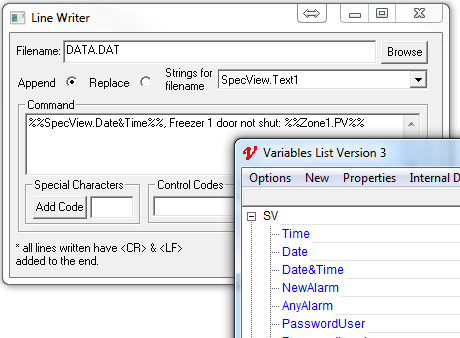
Two special kinds of Variable Substitutions are "%%SpecViewInstalledPath%%" and "%%SpecViewProjectPath%%".
These strings point towards SpecView's installed path and the project path respectively.
These strings will mostly be used when utilizing SpecView's Write Line to file/printer Button Attribute or Strategy Controller Action.
As of SpecView 3.1.265, Variable Substitutions can be altered to display values in different formats such as: scientific, signed, unsigned, hex, and binary.
Additionally, SpecView Date, Time, and Date&Time values can be displayed in alternate formats as seen in Date and Time Formatting
The modifiers are added after the Variable Substitution.
The format of the modifiers is ##<size><type>##.
The <size> value is the precision; the number of decimal places or the number of leading zeroes in the value.
The <type> value is the type of modifier such as: E for scientific, S for signed numbers, U for unsigned integers, H for hexadecimal, and B for binary.
Date, Time, and Date&Time will have the modifier ##<type>## where the value for type can be found in Date and Time Formatting.
The values must be present on an open screen (GDW).
For instance, if adding modifiers to the Date&Time variable, then Date&Time needs to be on an open window in the project.
If the variable Furnace 1.Process Value needs be to displayed in the scientific format with 4 decimal places, then the format of the Variable Substitution would be %%Furnace 1.Process Value%%##4E##.
Therefore, if the Furnace 1.Process Value was 0.000000012345, then the Variable Substitution would display 1.2345 E-08.
Furnace 1.Process Value must be on an open GDW if using modifiers.
If the variable Furnace 1.Process Value needs be to displayed as a signed number with 3 decimal places, then the format of the Variable Substitution would be %%Furnace 1.Process Value%%##3S##.
Therefore, if the Furnace 1.Process Value was 12345, then the Variable Substitution would display 12.345.
Also, the value can be padded with leading zeroes.
To add leading zeroes, the format of the Variable Substitution must be %%Furnace 1.Process Value%%##08S##.
Therefore, if the Furnace 1.Process Value was 12345, then the Variable Substitution would display 00012345.
Three leading zeroes were added to ensure 8 numbers as per the ##08S## modifier.
Furnace 1.Process Value must be on an open GDW if using modifiers.
This format is valuable when displaying values over 32767.
If the variable Furnace 1.Process Value needs be to displayed as an unsigned number with 3 decimal places, then the format of the Variable Substitution would be %%Furnace 1.Process Value%%##3U##.
Therefore, if the Furnace 1.Process Value was 12345, then the Variable Substitution would display 12.345.
Also, the value can be padded with leading zeroes.
To add leading zeroes, the format of the Variable Substitution must be %%Furnace 1.Process Value%%##08U##.
Therefore, if the Furnace 1.Process Value was 12345, then the Variable Substitution would display 00012345.
Three leading zeroes were added to ensure 8 numbers as per the ##08U## modifier.
Furnace 1.Process Value must be on an open GDW if using modifiers.
This is used to display integers in the hexadecimal format.
If the variable Furnace 1.Process Value needs be to displayed in the hexadecimal format with 4 leading zeroes, then the format of the Variable Substitution would be %%Furnace 1.Process Value%%##08H##.
Therefore, if the Furnace 1.Process Value was 12345, then the Variable Substitution would display 00003039.
Four leading zeroes were added to ensure 8 numbers as per the ##08H## modifier.
Furnace 1.Process Value must be on an open GDW if using modifiers.
This is used to display integers in the binary format.
If the variable Furnace 1.Process Value needs be to displayed in the binary format with 16 digits, then the format of the Variable Substitution would be %%Furnace 1.Process Value%%##16B##.
Therefore, if the Furnace 1.Process Value was 11, then the Variable Substitution would display 0000000000001011.
Twelve leading zeroes were added to ensure 16 digits as per the ##16B## modifier.
Furnace 1.Process Value must be on an open GDW if using modifiers.
The current format of the SpecView Date variable is the abbreviated month name followed by the day of month as a decimal number (0-31) and the year with century (2025).
However, this variable can be displayed as a month in decimal numbers (0-12) followed by a day of the month in decimal numbers (0-31) and the year with the century when used elsewhere such as creating Log Report File Names.
To do this, the Variable Substitution must be %%Date%%##%m%d%Y##.
Therefore, if the current date is Nov 15, 2025, the value displayed will be 11152025.
Additional modifiers can be found in Date and Time Formatting.
Date needs to be on an open GDW if using modifiers.
The current format of the SpecView Date&Time variable is displayed as military time with no seconds, followed by the abbreviated month name, day of month as a decimal number (0-31), and the year with century (2025).
However, this variable can be displayed as a with the date first followed by the time when used elsewhere such as creating Log Report File Names.
To do this, the Variable Substitution must be %%Date&Time%%##%Y%m%d_%H%M##.
Therefore, if the current time is 14:10:00 and the date is Nov 17, 2025, then the value displayed will be 20251117_1410.
Additional modifiers can be found in Date and Time Formatting.
Date&Time needs to be on an open GDW if using modifiers.