|
<< Click to Display Table of Contents >> TCP/IP Auto Detection |
  
|
|
<< Click to Display Table of Contents >> TCP/IP Auto Detection |
|
TCP/IP Auto Detection for instruments connected via TCP/IP works only with Instruments supporting Modbus/TCP, either natively or via an Ethernet Bridge.
Native instruments are:
• ModMux MMTCP-xxx range
• Honeywell HC900
• Honeywell TrendView Recorder
• Eurotherm Chessell 5000 recorder
Ethernet Bridges allow any Modbus RTU device to be communicated with by Modbus TCP/IP. Some examples of these Bridges are:
• ModMux TCPCONV
• Lantronix CoBox
• Honeywell Ethernet bridge
The Modbus protocol specifies a Slave Address, for RS422/485 devices, this is the address of the instrument over comms. For Modbus/TCP, the slave address is still relevant in the following cases:
For native instruments, there is only one Slave Address per IP Address because there is only one instrument. In this case the Slave Address is usually 1.
For Bridge connected instruments, there can be up to 255 discrete Modbus Slaves connected through the one IP addressed bridge, so the Slave Address has the usual meaning.
In SpecView's Auto detect setup we can specify a start and end IP Address. SpecView will start at the beginning IP Address and scan Slave Addresses 1 to 255 on that IP address before moving to the next IP address.
In the case where each IP address is a native Modbus/TCP instrument this scanning can be unnecessary, as there is only ever one Slave Address to be found. In this case the Skip to Next IP button can be used in a similar way to the existing Skip to Next Port button.
It is useful to think of each IP Address as a separate COM port. Where it is clear that there is only one instrument attached to a port then looking for 254 more instruments is not required.

Firstly, if all the instruments to be auto detected are accessible via TCP/IP then set the Protocol for all the COM ports to <None>.
Protocol:
Select the relevant protocol for one of the instruments to be detected.
Port:
The Port field should be left as 502 unless there is a specific reason to change it. Port 502 is the standard Modbus TCP/IP port.
Timeout:
Due to limitations inside the Modbus TCP/IP protocol and the Internet in general, scanning for Slave Addresses on a single IP Address can take a long time. The Timeout field is used to control this. For a LAN, the default of 5 seconds is suggested, meaning that one Slave Address per 5 seconds is tested. For testing across the Internet, a higher value is recommended, such as 25 seconds.
Begin: and End:
This allows you to specify a range of IP addresses and permits all the addresses in the range to be scanned for instruments, or if the precise address is not known.
The Ending IP Address is set to the same as the start address by default, this allows for quick scanning of a single IP Addressed native instrument or a string on a single bridge.
The Honeywell HC900 Auto detect is pre-set as there can only be one Slave Address on any given IP Address, so it will always skip to the next IP Address (if any) when an HC900 is found.
Click 
For each instrument found this box is displayed:
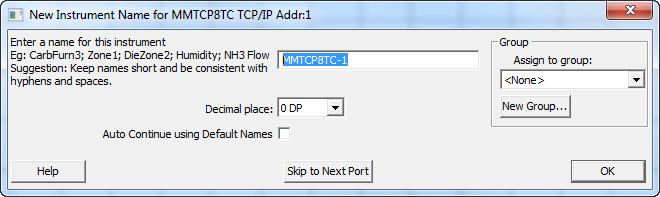
This allows the name for each instrument to be assigned (or use the default names), specify the decimal places and if required assign to a group.
Once the instrument view(s) have been displayed on the GDW (which may be behind the Ports and Protocols box) then click  and the following dialog will be displayed:

To finish scanning for instruments click OK. To scan for more instruments click Cancel.
To subsequently add further TCP/IP instruments to this project use Test Comms for Update or add additional instruments manually .