|
<< Click to Display Table of Contents >> ActiveX Rolling Average |
  
|
|
<< Click to Display Table of Contents >> ActiveX Rolling Average |
|
This describes the steps to setup the SVRollAv1 ActiveX Control to compute rolling averages within SpecView.
However in order to use this control it is necessary to have the ActiveX Class 1 option enabled on the dongle. Please contact your SpecView representative for the price of this option.
SVRollAv1 functionality:
| • | SVRollAv1 provides a rolling average output computed from an input value. As with all ActiveX controls within SpecView if an integer or string is linked to this input then it will be converted to a number (with decimals). |
| • | The rolling average computation can be stopped and started at will. |
| • | A number of history items must be specified as inputs. This provides the base from which the rolling average is computed. The number of history items can be up to 2,000,000,000. |
| • | A time base in seconds is required which controls the rolling average computation, reading an input value and computing the new rolling average. |
| • | The control has the concept of “good” and “bad” values according to a “status” input value which is checked against a list of “good” input values. The number of values in history that are “good” or “bad” are available as outputs, as is the percentage of samples “missed” (caused by “bad” values). |
| • | The rolling average can be set to an NCA (Not Currently Available) value (set by an input with a default of 0) if not enough values are “good”. There is also an output Boolean to indicate this state. |
How to ‘wire’ the SVRollAv1 ActiveX control into SpecView:
| • | SVRollAv1 will only work with recent versions of SpecView. |
| • | Ensure that SVRollAv1 ActiveX control is registered on the SpecView PC. |
| • | Insert an SVRollAv1 ActiveX Control onto a GDW (screen) and then open the “Link to Variables…” box as below: |
On the "Inputs" tab:
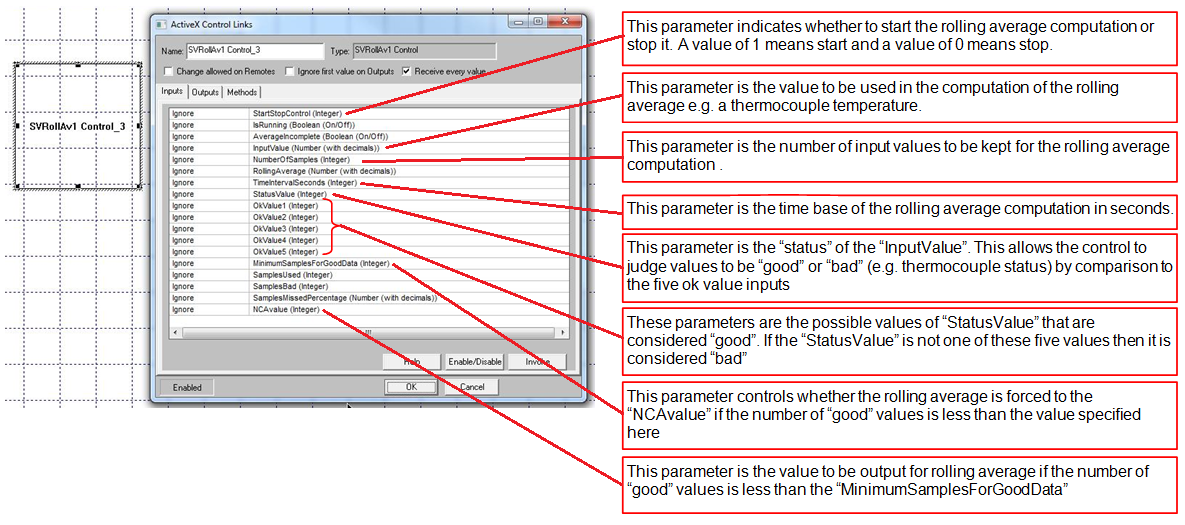
Then on the "Outputs" tab:
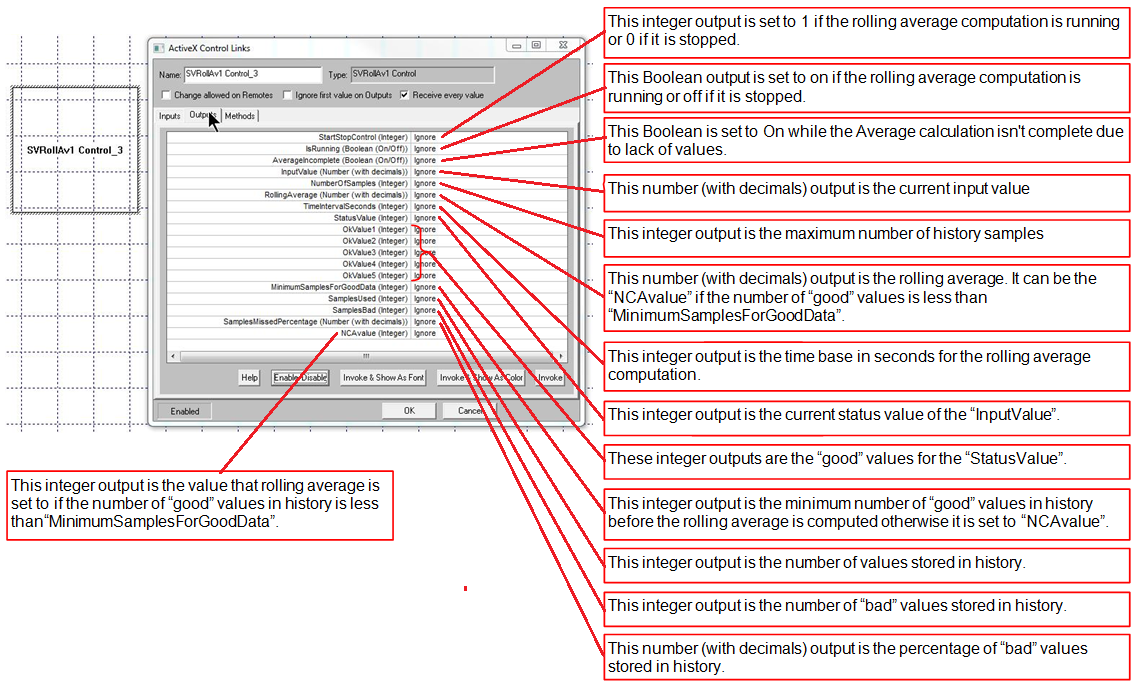
If the Status value and OK values are not needed then specify 0 against these inputs:
“StatusValue”
“OkValue1”
“OkValue2”
“OkValue3”
“OkValue4”
“OkValue5”
This will cause all of the “InputValue” values to be considered “good”.